
Most AWS problems don’t start with bad technology choices.
They start with a weak foundation.
At first, everything feels fine: a couple of AWS accounts, some IAM users, maybe a shared VPC. But as teams grow, environments multiply, and compliance questions appear, cracks start to show. Security becomes reactive. Costs are hard to explain. Nobody is quite sure who owns what.
This is exactly the problem AWS Landing Zones are meant to solve.
In this post, we’ll walk through the main AWS Landing Zone reference architectures, explain when each one makes sense, and explore real-world scenarios so you can choose the right starting point — not just the “most enterprise” option.
What Is an AWS Landing Zone?
An AWS Landing Zone is a well-architected, multi-account AWS environment designed to support growth, security, and governance from day one.
Instead of putting everything into one AWS account, a landing zone uses multiple accounts, organized under AWS Organizations, with shared security, logging, and identity controls. This creates natural isolation boundaries while still allowing central visibility and control.
A good landing zone answers questions like:
- Where do production workloads live?
- How are logs and security events collected?
- How do teams get access without breaking rules?
- How do we grow without redesigning everything?
AWS provides guidance and tooling — most notably AWS Control Tower — to help teams implement these patterns using proven defaults.
The Core Ideas Behind All Landing Zones
Before diving into architectures, it helps to understand the principles they all share.
A landing zone assumes that not all workloads are equal. Production systems should be harder to break than development environments. Security tools should not live in the same account as application code. Logs should be protected from tampering.
To achieve this, landing zones typically rely on:
- Multiple AWS accounts to reduce blast radius
- Centralized security and logging
- Strong identity and access controls
- Guardrails that prevent dangerous actions
What changes between architectures is how accounts are grouped and how strict the controls are.
1. Basic Landing Zone: Starting Simple
The Basic Landing Zone is the smallest useful version of a multi-account AWS setup.
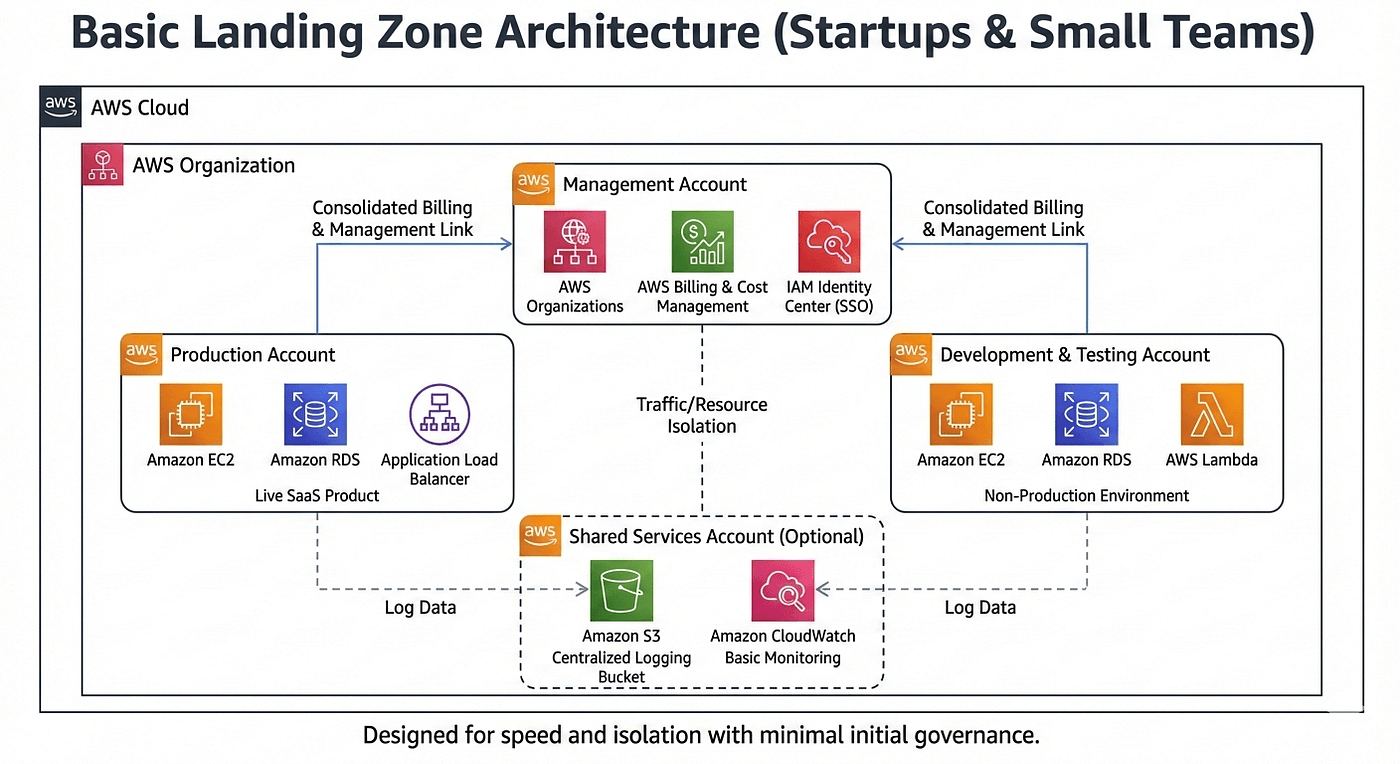
It usually consists of a management account, one or two workload accounts, and sometimes a shared services account. All accounts sit under a simple organizational structure with minimal policies.
This approach works well when the organization is small and speed matters more than formal governance.
When This Architecture Makes Sense
If you’re a startup or a small team just getting serious about AWS, this is often the right place to start. You might only have one production application and a non-production environment. Compliance requirements are light, and the same engineers handle infrastructure, security, and deployments.
The key goal here is avoiding the single-account trap without slowing the team down.
A Real Scenario
Imagine a startup launching its first SaaS product. They create:
- One AWS account for production
- One AWS account for development and testing
- Centralized billing and basic logging
This gives them isolation between prod and non-prod while keeping operational overhead low.
The Tradeoff
The Basic Landing Zone is easy to understand and quick to deploy, but it doesn’t scale forever. As more teams or services appear, governance becomes inconsistent, and permissions grow messy. It’s a starting point — not a final destination.
Terraform Template
provider "aws" {
region = "us-east-1"
}

resource "aws_organizations_organization" "org" {
feature_set = "ALL"
enabled_policy_types = ["SERVICE_CONTROL_POLICY"]
}

resource "aws_organizations_account" "shared" {
name = "shared-services"
email = "shared@example.com"
}

resource "aws_organizations_account" "prod" {
name = "prod"
email = "prod@example.com"
}

resource "aws_organizations_account" "dev" {
name = "dev-test"
email = "dev@example.com"
}
2. Environment-Based Landing Zone: Separating Risk
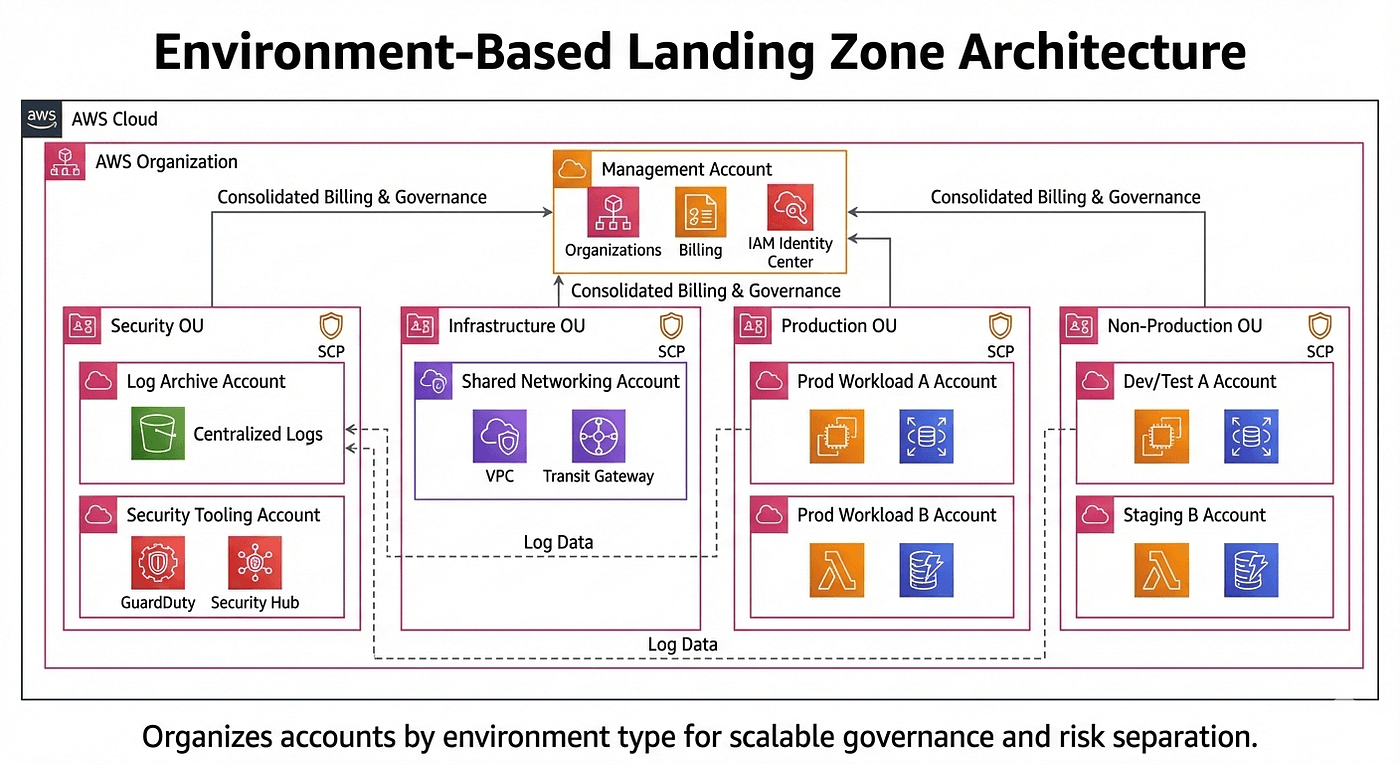
An Environment-Based Landing Zone organizes AWS accounts by environment type rather than by application.
In this model, production accounts live under a “Prod” organizational unit, non-production accounts live under “Non-Prod,” and shared services and security tooling live in their own dedicated areas.
This structure is especially useful when production needs much tighter control than everything else.
When This Architecture Makes Sense
This approach works well for growing organisations that have multiple teams deploying into shared environments. Production stability matters, and leadership wants strong guarantees that experimental changes in development won’t affect customers.
It also works well when compliance requirements start to appear, but full enterprise governance would be overkill.
A Real Scenario
Consider a mid-size SaaS company with several teams working on related services. Production environments are tightly controlled, with restricted permissions and strict monitoring. Development environments allow more freedom so teams can move quickly.
The Tradeoff
This model is simple and effective, but it can limit team autonomy. Teams may need to coordinate changes in shared environments, and customization for individual products can become harder as the organisation grows.
Terraform Template
provider "aws" {
region = "us-east-1"
}

resource "aws_organizations_organization" "org" {
feature_set = "ALL"
enabled_policy_types = ["SERVICE_CONTROL_POLICY"]
}

# Create OUs
resource "aws_organizations_organizational_unit" "security" {
name = "Security"
parent_id = aws_organizations_organization.org.roots[0].id
}

resource "aws_organizations_organizational_unit" "production" {
name = "Production"
parent_id = aws_organizations_organization.org.roots[0].id
}

# Create Account in Prod OU
resource "aws_organizations_account" "app_prod" {
name = "app-production"
email = "app-prod@yourcompany.com"
parent_id = aws_organizations_organizational_unit.production.id
}

# Create Account in Security OU (for logs)
resource "aws_organizations_account" "log_archive" {
name = "log-archive"
email = "logs@yourcompany.com"
parent_id = aws_organizations_organizational_unit.security.id
}
3. Workload-Based Landing Zone: Scaling Teams, Not Just Infrastructure
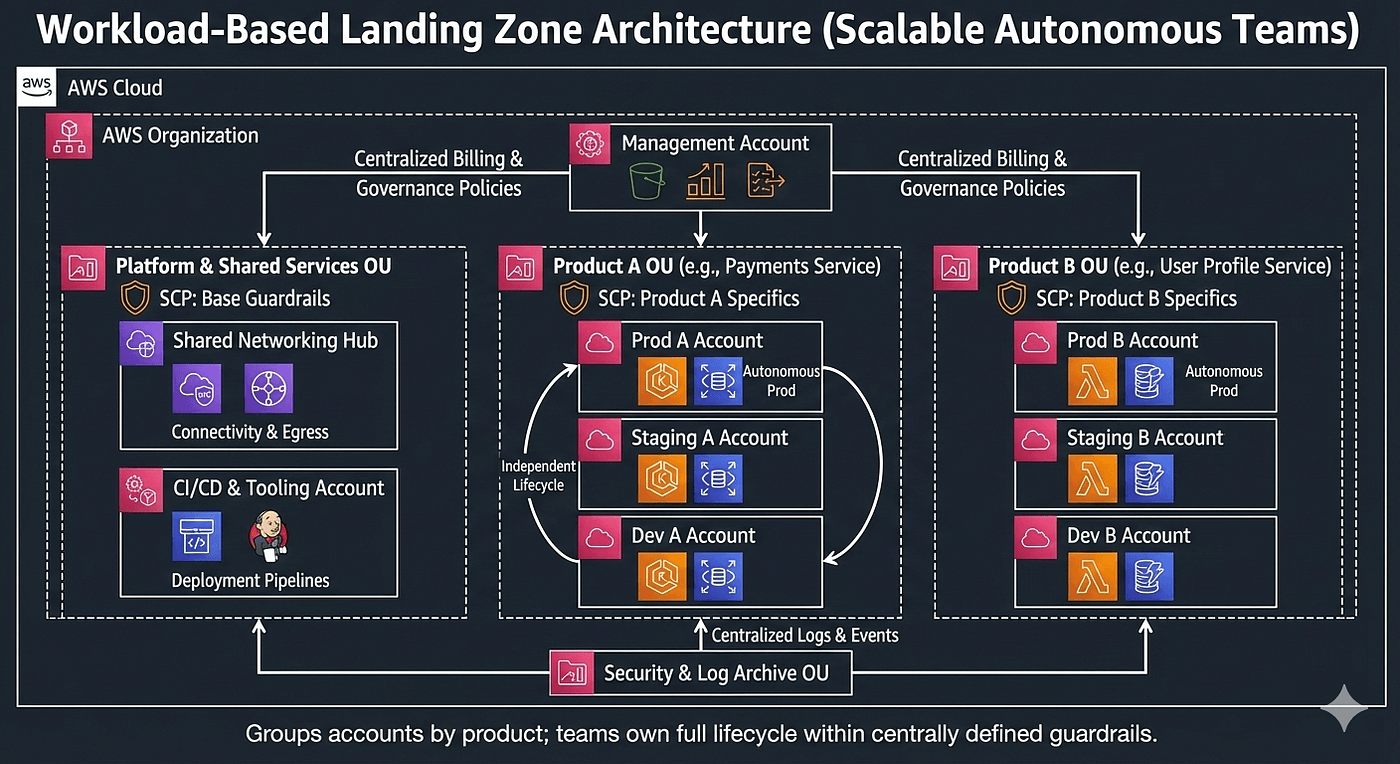
A Workload-Based (or Product-Based) Landing Zone groups accounts by application or product instead of environment.
Each product typically owns its own set of accounts — development, testing, and production — all grouped together. A central platform or cloud team provides guardrails, but individual teams own their full lifecycle.
When This Architecture Makes Sense
This model shines when you have multiple autonomous teams and a strong DevOps culture. Teams deploy independently, manage their own infrastructure, and are responsible for security and cost within defined boundaries.
It’s a natural fit for microservices, platform companies, and organisations that want to scale their engineering teams without creating bottlenecks.
A Real Scenario
A large tech company with dozens of services uses a workload-based landing zone. Each team has its own AWS accounts and can deploy on its own schedule. Costs are clearly attributed, ownership is obvious, and failures are isolated to individual products.
The Tradeoff
This approach scales extremely well, but it requires maturity. Automation, standardized pipelines, and strong baseline policies are essential. Without them, account sprawl and inconsistent practices can creep in.
Terraform Template
provider "aws" {
region = "us-east-1"
}

resource "aws_organizations_organization" "org" {
feature_set = "ALL"
enabled_policy_types = ["SERVICE_CONTROL_POLICY"]
}

# Product A OU
resource "aws_organizations_organizational_unit" "product_a" {
name = "Product-A"
parent_id = aws_organizations_organization.org.roots[0].id
}

# Product A Production Account
resource "aws_organizations_account" "prod_a" {
name = "product-a-prod"
email = "prod-a@yourcompany.com"
parent_id = aws_organizations_organizational_unit.product_a.id
}

# Product A Dev Account
resource "aws_organizations_account" "dev_a" {
name = "product-a-dev"
email = "dev-a@yourcompany.com"
parent_id = aws_organizations_organizational_unit.product_a.id
}
4. Compliance-Driven Landing Zone: Built for Regulation
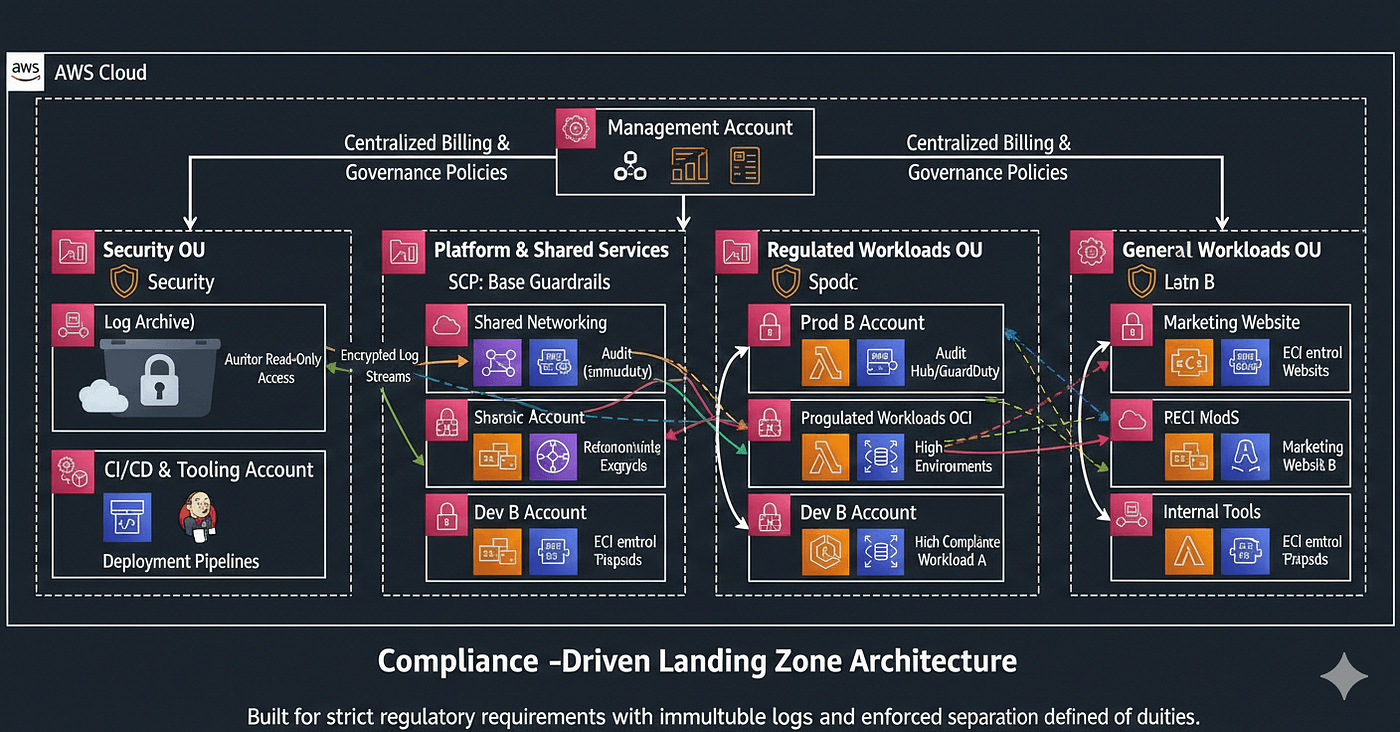
A Compliance-Driven Landing Zone is designed for organizations that must meet strict regulatory or audit requirements.
Accounts are carefully segmented, often separating regulated workloads from non-regulated ones. Security and audit accounts are locked down, and service control policies strictly limit what workloads can do.
When This Architecture Makes Sense
If you operate in industries like finance, healthcare, or government, this architecture is often non-negotiable. Regulations may require strong separation of duties, immutable logs, and clear audit trails.
A Real Scenario
A healthcare platform handling sensitive patient data uses a compliance-driven landing zone. Production workloads handling regulated data are isolated in tightly controlled accounts. Logs flow into dedicated security accounts that application teams cannot modify. Auditors can access read-only views without touching live systems.
The Tradeoff
Compliance-driven landing zones provide strong protection, but they increase complexity. Without automation, development velocity can suffer. Successful teams invest heavily in tooling to make secure paths the easy paths.
Terraform Template
provider "aws" {
region = "us-east-1"
}

resource "aws_organizations_organization" "org" {
feature_set = "ALL"
enabled_policy_types = ["SERVICE_CONTROL_POLICY"]
}

# 1. Create a Policy to prevent CloudTrail deletion
resource "aws_organizations_policy" "deny_cloudtrail_stop" {
name = "DenyCloudTrailStop"
description = "Ensures logs cannot be stopped by any user"
content = jsonencode({
Version = "2012-10-17"
Statement = [{
Effect = "Deny"
Action = ["cloudtrail:StopLogging", "cloudtrail:DeleteTrail"]
Resource = "*"
}]
})
}

# 2. Apply it to the entire Organization or a specific Regulated OU
resource "aws_organizations_policy_attachment" "compliance_lock" {
policy_id = aws_organizations_policy.deny_cloudtrail_stop.id
target_id = aws_organizations_organization.org.roots[0].id
}

# 3. Create the dedicated Audit Account
resource "aws_organizations_account" "audit" {
name = "compliance-audit-account"
email = "auditor@yourcompany.com"
}
5. Multi-Region Enterprise Landing Zone: Operating at Global Scale
The Enterprise Multi-Region Landing Zone builds on all the previous models and adds geographic scale.
Accounts, security tooling, and logging are designed to operate across multiple AWS regions. Disaster recovery, failover, and data residency requirements are first-class concerns.
When This Architecture Makes Sense
This model is appropriate for large enterprises with global users, strict uptime requirements, or regional compliance rules. At this level, downtime is expensive, and architecture decisions directly impact the business.
A Real Scenario
A global platform operates in multiple regions to serve customers worldwide. Data is replicated across regions, security monitoring is centralized, and governance policies account for regional differences in regulation and availability needs.
The Tradeoff
This is the most powerful — and most complex — landing zone model. It requires experienced teams, disciplined processes, and a clear business justification.
Terraform Template (Multi-Provider)
# 1. Multi-Region Provider Configurationprovider "aws" {
region = "us-east-1"
alias = "primary"
}
provider "aws" {
region = "eu-central-1"
alias = "secondary"
}
# 2. Regional Organisational Unitsresource "aws_organizations_organizational_unit" "north_america" {
name = "North-America-Workloads"
parent_id = aws_organizations_organization.org.roots[0].id
}
resource "aws_organizations_organizational_unit" "europe" {
name = "Europe-Workloads"
parent_id = aws_organizations_organization.org.roots[0].id
}
# 3. Global Guardrail: "Region Deny" Policy
# This prevents anyone from launching resources in unapproved regions.
resource "aws_organizations_policy" "region_restriction" {
name = "RestrictToApprovedRegions"
content = jsonencode({
Version = "2012-10-17"
Statement = [{
Sid = "DenyAllOutsideApproved"
Effect = "Deny"
NotAction = "iam:*" # IAM is global and must be excluded
Resource = "*"
Condition = {
StringNotEquals = {
"aws:RequestedRegion": ["us-east-1", "eu-central-1"]
}
}
}]
})
}
# 4. Multi-Region Networking (Transit Gateway Example)resource "aws_ec2_transit_gateway" "primary_tgw" {
provider = aws.primary
description = "Main TGW for US"
}
resource "aws_ec2_transit_gateway" "secondary_tgw" {
provider = aws.secondary
description = "Main TGW for EU"
}
# 5. Inter-Region Peeringresource "aws_ec2_transit_gateway_peering_attachment" "global_peer" {
provider = aws.primary
peer_region = "eu-central-1"
peer_transit_gateway_id = aws_ec2_transit_gateway.secondary_tgw.id
transit_gateway_id = aws_ec2_transit_gateway.primary_tgw.id
}
Where AWS Control Tower Fits In
AWS Control Tower is AWS’s opinionated way to help organizations implement landing zones.
It automates account creation, applies baseline guardrails, and sets up centralized logging and security. For most teams, Control Tower is the fastest path to a solid landing zone.
Control Tower works especially well for basic, environment-based, and workload-based architectures. More advanced enterprises often extend it with custom automation and policies.
Choosing the Right Landing Zone
There is no single “best” landing zone — only the best one for your stage and goals.
A simple rule works surprisingly well:
Design for where you’ll be in one to two years, not where you are today.
Starting too complex slows teams down. Starting too simple and staying there too long creates expensive problems later.
Final Thoughts
AWS Landing Zones are not about control for its own sake.
They’re about making growth predictable.
A good landing zone makes security routine, ownership clear, and scaling less painful. It lets teams move fast without constantly reinventing rules or fixing foundational mistakes.
Get the foundation right, and the rest of AWS becomes a lot easier to live with.